
Playing a Battle Royale tournament
A Battle Royale stage is a series of games played in shared lobbies. Every game adds to one leaderboard. This article follows a game from the lobby code to the leaderboard. How points are counted is in Battle Royale.
Battle Royale works for any game. Most of this article applies to all of them. Fortnite tournaments add a few things of their own: a linked Epic Games account, the custom key and scoring from replays. They are covered at the end, under Fortnite tournaments.
Where to find your games
Open the tournament's Stages tab and select the Battle Royale stage. The page shows:
- Your lobby card for your next game, once there is something to show. See below.
- How this stage works: the placement points table, what a kill is worth, which games count and how ties are broken, read from the stage's own settings. It is open until the first game is done, then folds away.
- The games and the leaderboard. Games played counts the games that are done, and Next shows when the next one starts.
Within the hour before a game you are in starts, your home page also shows it under Up next.
Which games you play
If the whole field fits in one lobby, you play every game.
If the organizer set a limit on how many play in one lobby, each game has its own lobby, drawn when the organizer schedules that game. The draw picks whoever has played the fewest games so far, so everyone's number of games stays within one of each other. It never looks at points. The lobby card only appears for games you are in.
In a team tournament, everyone in the team's lineup gets the card and the code. If the team has no lineup, its owner does.
The lobby card
The You're in this lobby card appears once the organizer has set up your next game. It shows the game number and when the game starts, with a countdown that turns red in the last five minutes.
Until the organizer releases the code, the card says The organizer hasn't shared the code yet. It appears here when they do. When it is released, you get a Lobby code is ready notification and the code appears on the card. Select Copy to copy it.
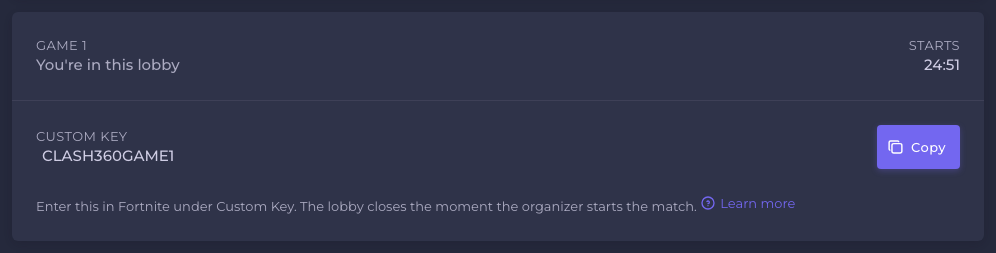
Only the players in that game and the tournament staff ever see the code. It is never in a notification or an email, so open the tournament to read it. If the organizer changes the code after releasing it, you are notified again. If only the start time changes, you get Lobby time changed and the code stays the same.
Keep the code to yourself
The game does not let the organizer choose who joins a custom lobby. Anyone who has the code can enter. If more players enter than the lobby holds, the game picks who gets in at random, not by who joined first.
So a code passed to someone who was not drawn into that game can cost a registered player their place. Do not post it in a chat, a stream or a screenshot. If you think the code has leaked, tell the tournament staff so they can set a new one.
Join the lobby
Enter the code in the game as the card describes, before the start time. The lobby closes the moment the organizer starts the match, and a player who is not in it by then misses the game.
A game you were drawn into and miss scores 0 for that game alone. You stay in the stage and play the next game you are drawn into.
After the game
What you do depends on how the game is scored.
- Games not scored from a replay (every game except Fortnite). After the game, select Upload end screen on the lobby card and add a screenshot of your end screen showing your placement and kills. The staff record your result from it. For a team, the owner or a team leader uploads. Send it soon after the game: once the organizer closes the game, the card moves on to your next one.
- Fortnite games are scored from a replay. You send nothing unless the organizer asks you to. See Fortnite tournaments.
Either way, you never enter a result yourself. Only the tournament staff do.
How the leaderboard updates
Standings change as soon as the staff save a game's results. The page updates on its own, with no need to reload.
The leaderboard shows each participant's points (Pts), wins, kills, average placement and a placement per game. Hover over Pts to see how a total is made up, and over a game's placement to see its kills and points. A game that does not count towards your total, because only the best games count, is shown faded. Select a game above the table, such as G2, to order the table by that game's placements, or All for the overall ranking.
If your result is wrong
Battle Royale games have no reports and no disputes. The tournament staff enter every result, and only they can correct one. Staff can correct a game's results while the stage is running.
- Check the game's placement and kills in the leaderboard.
- Tell the tournament staff what is wrong and what it should be. A Battle Royale game has no match chat, so use the tournament's chat, if it has one. See Chat and notifications.
- Send proof. In games not scored from a replay, your end screen screenshot is it.
The organizer's staff decide, not 360clash. See Disputes and Who handles what.
Fortnite tournaments
Fortnite is the only game whose Battle Royale results can be read from a replay file. That is why these extra steps exist only in Fortnite tournaments.
A linked Epic Games account. A replay identifies players by Epic account and nothing else. An organizer can make a linked account a condition of joining. If so, the join dialog asks you to link one first, and in a team tournament everyone on the roster needs one. Link it in advance from your account settings. See Epic Games account. If you play without one in a game scored from a replay, the replay cannot show how you did and the staff enter your result by hand.
The custom key. In Fortnite the code is called the Custom key. Enter it in Fortnite under Custom Key, then wait in the lobby for the organizer to start the match.
Scoring from the replay. The organizer uploads the match's replay after the game. The staff see what it found and confirm it before anything counts. The replay is not trusted on its own. If the organizer cannot record the end of the match themselves, they may ask one player in the game to upload it. In that case your lobby card says You've been asked to upload this game's replay and shows an Upload replay button. Stay in the match until it ends, and keep spectating if you are eliminated: a replay stops recording when you leave, and a partial one cannot be used. Replays can only be saved on PC.
If you think the replay scored you wrong, tell the staff as described above. They can correct any result after applying the replay. The organizer's side of this is in Scoring Fortnite games from replays.
Frequently asked
Still need help?
A problem with a match or a result? Ask the tournament's organizer first — see who handles what.