
Scoring Fortnite games from replays
Replays exist only for Fortnite Battle Royale games. In a Battle Royale stage of any other game, players upload screenshots of their end screens and you enter the results by hand. See Running matches.
A Fortnite game can be scored from a .replay file instead of typing every placement and kill by hand. This article is for organizers and staff running a Fortnite Battle Royale stage.
Why a replay and not a results feed
Epic gives a custom match host a lobby and nothing else. There is no results feed to read. The only record of what happened is the replay file that each player's own game saves on their PC. 360clash reads that file, shows you what it found, and scores nothing until you confirm.
A replay is a claim, not evidence
Replay files carry no signature, so a file can be edited before it is uploaded. That is why you always see a preview and choose to apply it. Check the table against what you know: the winner, the order near the top, anyone who looks out of place.
The preview also shows the standings table that applying would leave, with penalties, disqualifications and any standings override already counted. Nothing in it is saved until you apply.
Before the game: lobby code and release
Each game has its own lobby. On the stage's Games tab, use Set lobby on the game's row (Schedule on a stage with a lobby limit, where the lobby is drawn at that moment). Once a code is set, Edit lobby in the game's menu changes it.
- Enter the lobby code and the start time players count down to. The code is 4 to 16 letters and numbers.
- Create the lobby in Fortnite with the same code.
- Choose Save and release code when you want players to have it. Save alone keeps the code private.
Setting a code and releasing it are two separate steps on purpose. Fortnite lets anyone holding the code join, and if more than 100 people enter a key at once, Fortnite picks 100 of them at random. A code seen by someone who was not assigned to the game can cost a registered player their slot. So you and your staff see the code as soon as it is set, and the players assigned to that game see it only once you release it. Nobody else ever does.
If you change the code or time after releasing, everyone in the lobby is notified again.
Past one lobby, set Players per lobby on the stage. The lobby for each game is then drawn when you schedule it, starting with whoever has played the fewest games. Points are never considered.
Players need a linked Epic account
A replay identifies players by their Epic account and nothing else. Turn on Require a linked Epic Games account to join in the tournament settings so every entrant can be matched. A participant without a linked account cannot be found in a replay. They are listed in the preview and you enter their result by hand. See Epic Games account.
Uploading a replay
Only you, staff who can score the game, and one player you choose can upload. If you are eliminated and leave the lobby, your own file will be cut short, so hand the upload to someone who stays. Use Delegate upload on the game's menu and pick one of the players in that game.
- Finish the match. If eliminated, keep spectating. Do not return to the lobby.
- In Fortnite, open Career, then Replays, find the match and choose Rename and Save.
- On the PC, press Win + R and paste
%localappdata%\FortniteGame\Saved\Demos. - Take the newest
.replayfile. - On the game, choose Import replay and drop the file in. Choose Upload.
A player you delegate to can upload, but only staff can review and apply. Replays can only be taken from a PC, and files up to 60 MB are accepted.
Reviewing the preview
When the file has been read, the preview shows a row per participant with placement, kills and score. It also flags:
- Played but not assigned to this game. Fortnite lets anyone with the code in, so these players may have taken a slot from someone who was assigned. They score nothing unless you tick Include, and including one moves everyone below them down a place.
- Assigned but not in the replay. After the code was released, they are recorded as no-shows for that game alone: last place, no eliminations, and they are still in for the next game. If the code was never released, they are not counted as no-shows.
- No linked Epic account, or not in any event. The replay cannot say how they did, so they are never marked as no-shows. Enter their results by hand after you apply.
- Few of your participants matched. The preview counts how many assigned participants it found. If fewer than half appear, it warns you: you probably picked the wrong match, or players have not linked Epic Games.
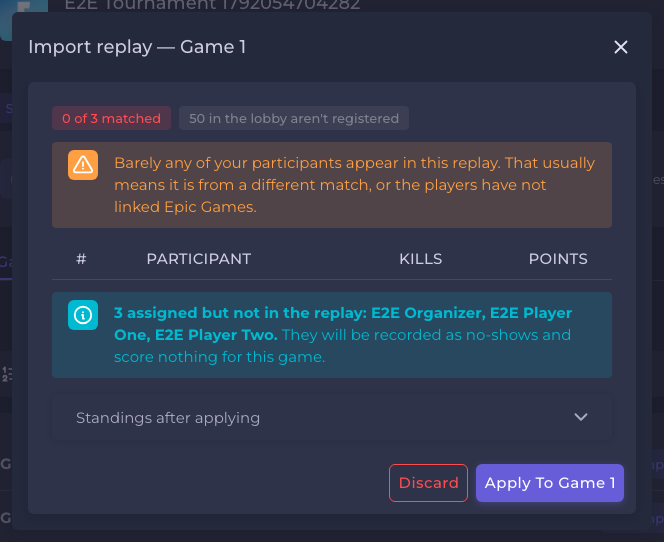
Here none of the tournament's three players were in the uploaded match, so the preview warns that the replay is probably from a different match and would record all three as no-shows.
Then choose Apply to game N to score the game, or Discard to throw the upload away. Standings are recalculated when you apply. You can still correct any result afterwards from Enter results.
Scoring itself, such as points per placement and per kill, kill caps and best-N-of-games, is set on the stage. The replay only provides placements and kills.
When a replay is refused
| What you see | What to do |
|---|---|
| "This replay only covers part of the match" | The recording stopped early. Upload one from someone who was there at the end. The winner is the safest bet. |
| "That is not a Fortnite replay" or "not one" | The file is not a real .replay, may have been renamed, or the download is incomplete. |
| "Newer version of Fortnite than we can read yet" | Epic changed the format. Enter the game's results by hand for now. 360clash never reads a version it has not verified, because a misread file would give you a believable but wrong scoreboard. |
| "Could not be read as a Fortnite replay" | Upload the original file, unmodified. |
| "Already been uploaded for this game" | That exact recording is already there. |
An empty list of warnings does not prove a recording is complete. Always check the top of the table yourself.
After the game
Choose Close game when the game is scored. Standings are recalculated and, once every game is closed, you can finish the stage. See Running matches and Finalize and payouts.
Epic's own terms
Fortnite events run under Epic's licence terms for third-party organizers, not 360clash's. Those terms restrict charging entry fees and cap prize totals. You are responsible for your own compliance. The tournament form warns you if you set an entry fee on a Fortnite tournament. 360clash does not issue or hold a matchmaking key for you.
Frequently asked
Still need help?
A problem with a match or a result? Ask the tournament's organizer first — see who handles what.