
Stages and seeding
A tournament is made of one or more stages. Each stage has its own format, and a stage can feed the next one, for example groups into a playoff. Everything here starts from the tournament's Stages tab, where each stage opens on its own page with tabs such as Bracket (or Groups, Rounds, Times, Scores, Games), Matches, Standings and Participants.
Add a stage
- Open the Stages tab.
- Click Add stage.
- Set a Stage name (for example Group Stage) and pick a Structure.
- Fill in the settings that appear for that structure.
You need at least one stage before you can publish.
Choose a format
| Structure | Use it when | Read more |
|---|---|---|
| Single Elimination | One loss and you are out | Single elimination |
| Double Elimination | A second chance through the losers bracket | Double elimination |
| Round Robin | Groups play everyone in their group | Round robin |
| Swiss | Paired by record each round, avoiding rematches | Swiss |
| Race | One race for everyone, ranked by result | Race |
| Points | One round for everyone, ranked by points scored | Points |
| Battle Royale | Scored games with placement and kill points | Battle Royale |
Formats that play duels also set a match format (Match formats) and tiebreakers (Tiebreakers). Changing a stage's format wipes its generated data and settings that belong to another family of formats. A stage can be edited freely until it starts. After that, only its name, third place match, late entry, self-report and advancement link can change.
Multi-stage tournaments
The first stage is the one with the lowest position. It seats everyone who registers, and it is the only stage check-in applies to. Later stages get their participants from earlier ones.
To link stages, edit the later stage and use Progress from with Earlier stages. For each earlier stage choose how people move on:
- Top performers: the best N advance by final standings. For round robin, N is per group.
- Everyone: every participant advances, seeded by final rank.
- Manual: you choose who advances after the stage finishes.
A link must point forward. If you leave a stage with no feeders, you add its participants by hand with Add participants. A link cannot be moved or removed once participants have advanced along it. The links together must send enough people to start the stage you feed: three for elimination, two for round robin, Swiss and Battle Royale, counted when every feeder sends a set number.
Seeding
Seeding applies to a stage while it is pending. The draw is made when the stage starts.
- A new first-stage participant gets the next seed, in registration order.
- Shuffle on the stage's Participants tab gives everyone a random seed. Seeds you set by hand are lost.
- On the stage's Participants tab, the up and down arrows on a row (Move up and Move down in the row menu on a phone) and Set seed… in the row menu change one seed. Whoever held the target seed takes the old one.
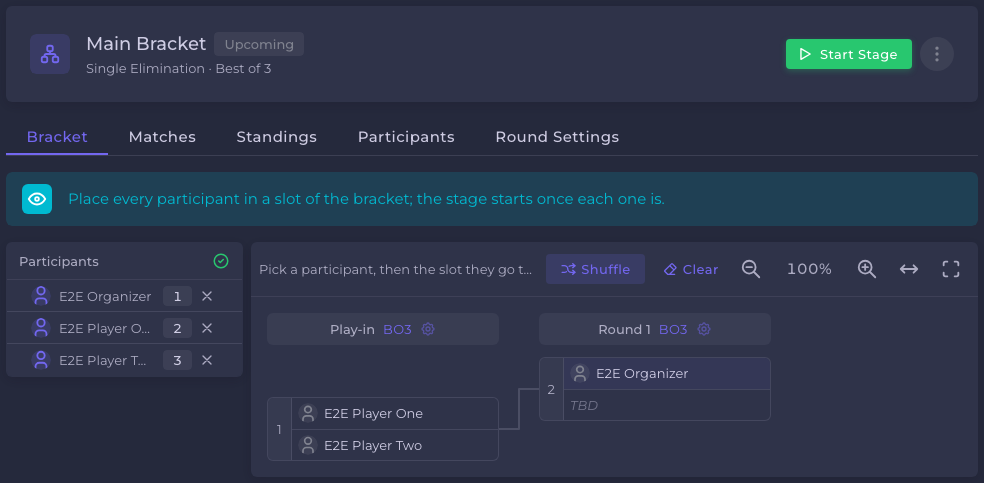
- In the first stage of a single or double elimination, nobody is seeded. On the stage's Bracket tab you place each participant into a slot from the list beside the bracket. Clear empties every slot and Shuffle places everyone at random. The stage cannot start until everyone who will play is placed. Seed numbers are not shown there, and "Higher seed" is not offered as a match tiebreak.
- A later elimination stage is seeded by the results feeding it and cannot be reseeded by hand.
Participants cannot see the bracket, groups or seeds before a stage starts. Only the people who run the tournament can.
Start a stage
Click Start stage on the stage's page. It generates the matches and seats everyone who is checked in and paid. The button only appears once the first three conditions below are met. These conditions can refuse it, in this order:
- The stage is not pending.
- The tournament is still a draft. Publish it first.
- A stage feeding it has not finished. The message names it.
- A hand-placed bracket has someone without a slot. The button stays disabled until everyone is placed.
- In the first stage with check-in on, participants who did not check in are removed first. See Check-in settings.
- Round robin: every participant must be in a group, and each group needs at least two.
- Paid stages: seats not yet paid are forfeited. Then the start is refused if nobody has been advanced in, if someone seated has no paid seat, or if too few paid for the format.
Elimination brackets hold 3 to 256 participants. When the first stage starts, the tournament becomes ongoing, invitations nobody answered expire, and team rosters lock for captains. Swiss generates round one only. Later rounds are paired as rounds complete.
Finish a stage and advance
No stage completes automatically. When the stage is ready, click Finish stage. Standings are finalized and people advance by the link you set:
- Manual: the stage completes and nobody advances yet. The Who advances dialog opens so you can pick participants. You can reopen it later from Manage advancement on a completed stage until the next stage has results.
- Top performers and Everyone: participants advance by rank. Out of round robin, qualifiers are seeded so group-mates meet as late as possible.
Participants a stage does not classify, such as disqualified ones or Race and Points entries who did not start, never advance. Advancing into a paid stage offers a seat but does not charge. The participant must pay. See Entry fees.
To run the matches themselves, see Running matches. To drop a stage, see Cancel or restore a stage.
Frequently asked
Still need help?
A problem with a match or a result? Ask the tournament's organizer first — see who handles what.