
Match day
This article follows a duel match from "my match is ready" to a confirmed result. Duels are the two-sided matches in elimination, round robin and Swiss stages. Race, Points and Battle Royale work a little differently, and the end of this article says how.
Find your match
- The Up next area on your home page lists the match that needs you now, or your next one, with a countdown when the match has a start time.
- When your match is ready, you get a Match ready notification and a card on screen that stays until you open or dismiss it.
- On the tournament page, open the Stages tab and select your match. It opens over the bracket, and also has its own page.
A match is Upcoming until both sides are known and it is playable, Live while it is being played, Disputed if the reports differ, and Completed once it is decided.
Match chat
Once both sides are known, the match gets its own chat room, if the tournament has chat switched on. On a phone it is the Chat tab next to Match; on a wider screen it sits beside the match. Both sides are in it (for a team, its owner and leaders), and the tournament staff can read it. Use it to agree on a time, share lobby details and sort out problems. See Chat and notifications.
If something goes wrong and you need staff, select Call admin in the chat header. See Disputes.
Coin flip and map veto
If the stage uses a coin flip, it is in the Your report card. Either side can flip it once, before the match is completed. The result stands, and nobody can flip again.
If the stage uses a map veto, a Map veto card shows whose turn it is. The side on turn bans or picks a map and confirms it. If the stage lets teams choose sides, the other side then chooses which side it starts on for each picked map, and on the last map the side that did not act last chooses. You are notified when your turn comes.
The organizer sets who goes first (the better seed, or random), how long each step lasts, and what happens when time runs out: either a map is banned or picked at random, or the veto waits and the staff are told. Staff can undo the last step or start the veto over.
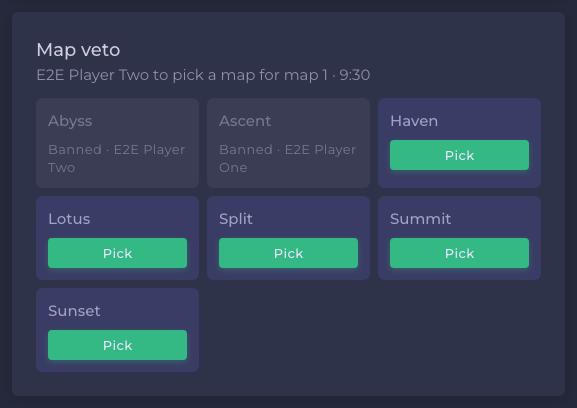
The veto decides the map and who picked it for each game. Your report then uses those.
Lobby details
In a duel, players share lobby details in the match chat. In Battle Royale games the organizer releases a lobby code (in Fortnite, a custom key). Once released, it appears in the tournament on the You're in this lobby card, only for players assigned to that game. Select Copy, then join the lobby in the game before the organizer starts the match.
Report the result
Only the owner or a team leader reports for a team. A solo player reports for themselves. The Your report card appears once the match is live, and stays while it is disputed.
- Enter the Final score. This is the main score and the only thing that decides the match. In a series it is maps won, for example 2:1.
- Optionally add what happened on each map: the map, who picked it and the score.
- Add proof if the tournament asks for it. See below.
- Select Submit result (once you enter a score, the button shows your result). Check the summary in Check your report, then select Send report.
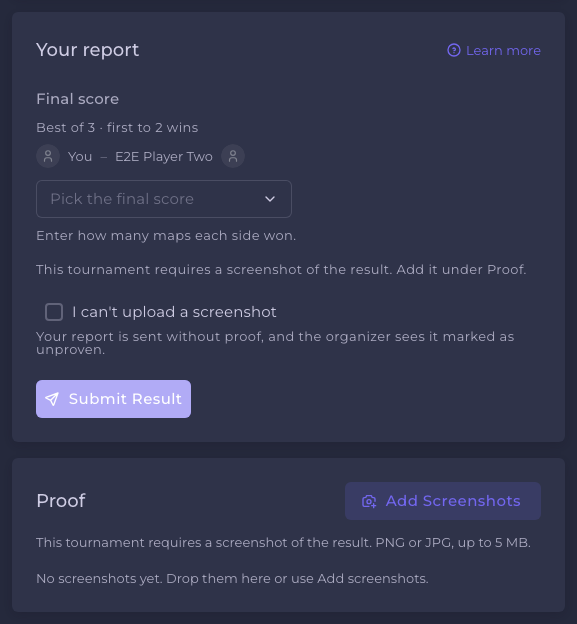
The score must be one the format can end on. A best-of-3 ends at 2 maps, for instance. A bracket match needs a winner: if the score is level, the form asks who won the tiebreak, and it tells you which scores are allowed if yours is not.
If your opponent reported first, the form is filled in with their score for you to check and correct.
Proof
Use Add screenshots on the Proof card to add screenshots of the result. You can add up to 10 images per side, PNG or JPG, up to 2 MB each. Proof is visible to both sides and the staff, not to spectators. You can still add proof after the match is completed.
If the tournament requires proof, your report needs a screenshot. If you cannot provide one, tick I can't upload a screenshot: your report is sent, and the organizer sees it marked as unproven.
When reports agree or differ
- Agree. The match completes and the winner moves on.
- Only one side has reported. The match stays live and your card says Your report is in while you wait. You can still select Edit my report.
- Differ. The match turns Disputed and the staff are told. A dispute does not lock anything. Both sides can correct their own report, and the match completes as soon as the two main scores agree.
Map details never cause a dispute. If you and your opponent describe a map differently, the staff see a flag but the result stands. You can add or fix map details after the match is completed.
See Disputes for what staff can do.
Other kinds of match
- Race. Each racer records their own result once while the race runs. Staff handle corrections.
- Points. You report your own score only if the organizer allowed self-reporting.
- Battle Royale. Only staff enter results. Only Fortnite games can be scored from a replay. In every other game, the lobby card asks you to upload a screenshot of your end screen after the game, and the organizer records your result from it. See Playing a Battle Royale tournament.
See Race, Points and Battle Royale.
Frequently asked
Still need help?
A problem with a match or a result? Ask the tournament's organizer first — see who handles what.